MacBook Display Issues (2016-2020): Flexgate & Screen Problems
Introduction
Does your MacBook Pro display suddenly have stripes, flicker or show an uneven "stage light effect" at the bottom edge of the screen? Then you may be affected by the notorious Flexgate problem. We explain what causes it, which models are affected, and what repair options exist.
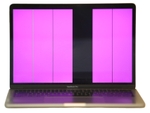
What Is the Flexgate Problem?

Flexgate is a design flaw that mainly affects MacBook Pro models from 2016 and 2017. The problem arises from display cables that are too short or too delicate, which wear out from repeatedly opening and closing the laptop.
The Most Common Symptoms:
- Uneven lighting at the bottom edge of the display (the "stage light effect")
- Colored or gray vertical lines on the screen
- Screen flickering, especially when moving the display
- Complete display failure: the screen stays black
Which MacBook Models Are Affected?
| Model | Years | Risk Level | Most Common Issues |
|---|---|---|---|
| MacBook Pro 13" | 2016-2020 | 🔴 2016-2017: High · from 2018: much rarer (lengthened cable) | Flexgate, stage light, complete failure |
| MacBook Pro 15" | 2016-2019 | 🔴 2016-2017: High · from 2018: much rarer | Vertical stripes, flickering |
| MacBook Pro 16" | 2019 | 🟢 Low | Rare, Apple lengthened the cables |
| MacBook Air | 2018-2020 | 🟢 Low | Occasional cable issues |
| MacBook 12" | 2015-2017 | 🟡 Medium | Display connection vulnerable |
From 2018 Apple used a longer display cable in the 13" models; the problem became much rarer but did not disappear.
Recognizing Symptoms: Does Your MacBook Have a Display Problem?
Early Warning Signs (Stage 1):
- Occasional brief flickering when opening
- Slight brightness differences at bottom edge
- Display takes a moment to "wake up"
Clear Symptoms (Stage 2):
- Bright spots at the bottom display edge (stage light effect)
- Colorful or gray vertical lines
- Regular display flickering
- Pink or green color distortions
Critical Symptoms (Stage 3):
- Image only visible at certain angles
- Areas of the screen remain black
- Complete failure, no image at all
- White screen where only the backlight is visible
Quick Test for Flexgate:
- Turn on MacBook
- Slowly open display from 45° to 120°
- Wait 5 seconds at each angle
- Watch for flickering, stripes or dropouts
Result: If problems only occur at certain angles → Flexgate likely!
Technical Causes in Detail
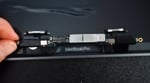
1. Cables Too Short
The display cables in affected models are minimally sized. They are stretched and bent with each opening and closing.
2. Material Fatigue
The thin flex cables consist of delicate conductor tracks that can break from repeated bending.
Solution Options
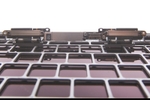
Short-term Measures:
- Try adjusting the display angle, find one where the problem is minimal
- Use an external display as a temporary solution for important work
- Handle carefully and avoid frequent opening/closing
Our Repair Options at Sadaghian:
- Panel replacement: only the LCD panel is replaced – you keep the lid, camera, True Tone sensors and cables, and you don't pay the €700–900 of a complete display assembly
- A tested used display assembly as a budget alternative on older models
- Flexgate cable repair: we repair or replace the display cable (€240 for the 13", €340 for the 15"/16"), with a 12-month warranty
Repair Costs
| Model | Repair Option | Estimated Cost |
|---|---|---|
| MacBook Pro 13" (2016/2017) | Flexgate cable repair | €240 |
| MacBook Pro 15"/16" | Flexgate cable repair | €340 |
| MacBook Pro 13" and Air 13" (up to M4) | Panel replacement | €420 |
| MacBook Pro 15" (2016-2019) and Air 15" (up to M4) | Panel replacement | €480 |
| MacBook Pro 16" Intel (2019) | Panel replacement | €580 |
| MacBook Pro 14" and 16" (Apple Silicon) | Panel replacement | €740 |
All prices in euros incl. VAT; diagnosis and shipping are free.
All prices include installation and a 12-month warranty. You'll receive an exact price after the free diagnosis.
Preventive Measures
Even though the problem is design-related, you can extend the lifespan:
Prevention Tips:
- Always open the display from the center, slowly
- Don't open beyond 120°
- Don't place anything on the MacBook during transport
- Keep hinges clean and dust-free
- Use a padded bag for transport
Frequently Asked Questions about MacBook Pro Display Problems
What is the MacBook Pro Flexgate problem?
Flexgate is a design flaw that mainly affects MacBook Pro models from 2016 and 2017. The display cables are too short or too delicate and wear out from repeatedly opening and closing the laptop. This first leads to uneven backlighting (the "stage light effect") and later often to complete display failure or vertical stripes.
Which MacBook Pro models are affected by display problems and Flexgate?
The MacBook Pro 13" and 15" models built in 2016 and 2017 are particularly prone to display-cable issues like Flexgate. Apple slightly adjusted the design in later years, but similar symptoms can occur on other models too.
What does a Flexgate repair cost?
Our Flexgate cable repair is a fixed price: €240 (13", 2016/2017) or €340 (15"/16"), including free diagnosis and a 12-month warranty. Only if the panel itself is damaged do we replace just the panel, €420–740 depending on the display size. Contact us for a free diagnosis and a non-binding quote.
Does Apple have a Flexgate repair program?
Apple ran a free service program for certain 13" MacBook Pro 2016 models with backlight issues; that program has ended. If your MacBook shows these symptoms, we repair or replace the display cable: €240 for the 13" (2016/2017), €340 for the 15"/16", incl. VAT, with a 12-month warranty.
Can I repair the display problem myself?
DIY repair is not recommended. The display cable is extremely delicate and replacement requires specialist tools and experience. A failed attempt can cause additional damage. Professional repair is the safer option.
How long does a display repair take?
Diagnosis usually on the day of arrival; a cable repair or a panel replacement then usually takes one working day after your approval, so typically 2–3 working days in the workshop. A display for a rare model has to be ordered and takes longer. We inform you of the expected duration right after diagnosis.
Will I lose my data during a display repair?
No. A display repair doesn't touch your data. The display is a separate component, so the SSD and everything stored on it remain untouched.
How do I know if my MacBook is affected by Flexgate?
Typical signs: stage light effect along the bottom of the screen, display only works at certain opening angles, vertical stripes, or flickering. If you notice any of these, a professional diagnosis is advisable.
Other Display Problems (Not Flexgate)
Not every display problem is Flexgate. Here are other common causes:
LCD Panel Defects:
- Dead pixels: individual dots stay black or white
- Pressure marks: dark spots from mechanical pressure
- Display crack: spider web pattern after a drop
- Liquid crystal failure: black spots spreading across the screen
Graphics Chip Problems:
- Horizontal stripes: often pointing to a GPU problem
- Artifacts like geometric patterns or colorful blocks
- Kernel panic: system crashes under graphics load
Software Problems:
- Problems appearing after a macOS update (driver incompatibility)
- If an external monitor works fine, the graphics chip is healthy and the fault is usually in the display or its cable
- If Safe Mode works, there's likely a software conflict
Diagnosis Tip: Connect an external monitor. If it works perfectly, the problem is likely with the display or cable, not the graphics chip.
Display Technologies Compared
Mini-LED (MacBook Pro 14"/16" from 2021)
- Near-AMOLED contrast with local dimming zones
- 1600 nits peak brightness
- ProMotion 120Hz
- Blooming effect possible in dark scenes
Liquid Retina (MacBook Air from M2)
- IPS LCD with LED backlight
- 500 nits brightness
- P3 color gamut
- Even illumination
Retina Display (Older Models)
- Standard IPS panel
- 400-500 nits
- 2016/2017 models: Flexgate-prone
Spare Parts & Repair Options
| Repair Option | Price Range | Duration | Warranty |
|---|---|---|---|
| Cable repair (Flexgate) | €240–340 | 1–2 working days | 12 months |
| Display repair (panel stays) | €180–740 | 2–3 working days | 12 months |
| Panel replacement | €420–740 | 2–3 working days | 12 months |
All prices in euros incl. VAT; diagnosis and shipping are free.
All display repairs and pricing details are available on our MacBook Display Repair main page.
Emergency Help for Display Problems
If your display shows any of these symptoms, you can send your MacBook in or drop by – diagnosis is free and you get a fixed quote before we start.
Your Options:
- Visit in person: Leverkusenstr. 3, 22761 Hamburg, Germany
- Free shipping with a prepaid DHL label
- Phone consultation: +49 40-228643240
- WhatsApp support: +49 40-228643211