How to Pack Your MacBook Correctly for Shipping
When you send your MacBook to us, you should ensure it is well and safely packaged. We often see MacBooks that are incorrectly and negligently packed.
Mistake #1: Too Loose in the Box
Placing the MacBook loosely in a box with only 2-3 sheets of paper and then taping it shut. During transport, the MacBook will fly back and forth in the box, causing impact damage and scratches.
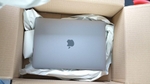
Mistake #2: Box is Too Small
The opposite of mistake #1. The MacBook is in a box that is far too small. It rests against the walls and absorbs every shock, which can lead to unsightly dents on the corners.

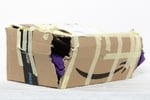
Mistake #3: Using a Damaged Box
Shipping the MacBook in a broken box. A damaged box offers no protection. In the worst-case scenario, the MacBook or any included spare parts could fall out of the box. As unbelievable as it sounds, we receive such boxes time and again, held together only by a few pieces of tape.
Common Shipping Damage
- Display cracks from pressure
- Case dents from impacts
- Water damage from moisture
- Scratches from friction
- Logic board damage from vibration
Preparation Before Shipping
1. Create Backup
Back up your data with Time Machine or iCloud. For data recovery, don't make any changes to the device.
2. Prepare MacBook
Turn off the MacBook completely, disconnect the power adapter and remove all external devices and stickers.
3. Document Condition
Take photos of the device's condition and note the serial number and any existing damage.
The Right Packaging
Step-by-Step Guide:
- First protective layer: Wrap the MacBook in anti-static wrap or a soft cloth to prevent scratches.
- Cushioning: Wrap the device in multiple layers of bubble wrap, especially around corners and edges.
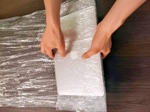
- Place in box: Put a layer of cushioning material in the box, place the MacBook in the center and fill all empty spaces.
- Securing: Make sure the MacBook cannot move (shake test) and seal the box firmly with high-quality packing tape.
The original packaging (OEM) is ideal: place it in a larger double-walled box with packing paper above and below for cushioning.
Avoid Common Mistakes
- Boxes too small: No room for cushioning increases breakage risk.
- Newspaper as cushioning: Doesn't provide adequate shock protection.
- Loose items in package: Power adapters and cables can damage the display.
- No insurance: Always get shipping insurance for expensive devices.
Professional Shipping Service
Use our free and insured DHL shipping for your repair. We take care of the secure handling.
Unsure how to pack your MacBook?
Use our free DHL label and packing guide. We can send a proper double‑wall box on request. Free diagnosis.