MacBook Battery Swelling: What You Need to Know
The Problem: Swollen MacBook Battery
Critical Issue: The battery is one of the MacBook's major weak points. When damaged or when using non-original batteries, the battery can swell inside your MacBook. It becomes so thick that it pushes the MacBook apart from the inside.
Stages of Battery Swelling
Phase 1: Trackpad Displacement
It starts with the trackpad. The swelling battery pushes the trackpad upward from underneath. You might notice:
- Trackpad feels raised or uneven
- Clicking becomes difficult or impossible
- Trackpad may stop responding properly
- In worst cases, the trackpad suffers irreparable damage
Phase 2: Case Separation
As the battery continues to swell, it pushes the bottom case apart:
- Bottom case begins to bulge outward
- Gaps appear between case components
- Screws may pop out or strip
- Eventually, the case splits open completely
Visual Signs: As shown in repair photos, swollen batteries can push the MacBook apart on both sides, creating visible gaps and deformation.
Can a Swollen Battery Explode?
Good News: No Explosion Risk
Many people fear that a swollen battery might explode or catch fire at any moment. However, the opposite is true:
- The battery swells and then remains in that state
- It cannot spontaneously combust or explode on its own
- Replacement is completely safe when done properly
- The swelling is actually a safety mechanism preventing worse outcomes
Important: While explosion is unlikely, a swollen battery is still dangerous. Don't puncture, compress, or expose it to extreme heat. Always handle with care.
Why Do MacBook Batteries Swell?
Common Causes:
- Natural degradation over time (typically 3-5 years)
- Consistent high temperatures accelerate swelling
- Leaving the MacBook plugged in constantly (though modern models manage this better)
- Manufacturing defects — rare but possible even in new batteries
- Drops or impacts that damage battery cells
- Third-party batteries that may lack proper safety features
Chemical Process:
Battery swelling occurs when gases build up inside the battery cells. This happens when:
- The battery's internal chemistry breaks down
- Electrolyte decomposes and produces gas
- The battery's sealed casing traps these gases
- Pressure builds up, causing physical expansion
Immediate Actions to Take
If You Notice Battery Swelling:
- Power down your MacBook immediately
- Unplug the charger
- Don't press on swollen areas or force the case closed
- If possible, quickly back up important files
- Store the device in a cool, dry place away from flammables
- Contact a repair service immediately
What NOT to Do:
- Don't puncture or compress the battery
- Don't attempt DIY removal unless experienced
- Don't dispose in regular trash
- Don't expose to extreme temperatures
- Don't continue using the device
Battery Replacement
If you notice bulging in your MacBook's case or the trackpad protruding, the battery should be replaced. Here's how we handle it:
Our Replacement Process:
- Safely remove the swollen battery
- Inspect for additional damage
- Install genuine replacement battery
- Restore MacBook to original shape
- Test all affected components
- Properly recycle the old battery
What We Check:
- Trackpad functionality and alignment
- Case integrity and screw threads
- Internal cable connections
- Logic board for any damage
- Thermal management system
Prevention Tips
Extend Battery Life and Prevent Swelling:
- Keep your MacBook in cool environments
- Use the optimized battery charging feature in macOS
- Don't leave it stored with a full or empty charge
- Use Apple or certified chargers only
- Check battery condition regularly in System Information
- Replace batteries that show "Service Recommended" promptly
Storage Tips:
If storing your MacBook long-term:
- Charge to about 50% before storage
- Store in cool, dry place
- Power on and charge every 6 months
- Avoid extreme temperatures
Cost and Warranty Information
Replacement Costs:
- Out of warranty: $129-$199 depending on model
- AppleCare+ may cover it if the swelling isn't due to damage
- Check if your model qualifies for a battery recall program
Warranty Coverage:
Battery swelling may be covered if:
- MacBook is under warranty
- Battery has less than 1000 cycles
- No signs of physical damage
- Original battery (not third-party)
Environmental Considerations
Proper disposal of swollen batteries is important:
- Never throw in regular trash or recycling
- Always use certified e-waste recycling centers
- Apple Stores accept old batteries for free recycling
- Many local electronics stores also offer battery recycling
Don't Wait
A swollen MacBook battery is a serious but manageable issue. While it won't explode, it requires immediate attention to prevent damage to other components. Professional replacement ensures safety and restores your MacBook to full functionality.
Need Battery Replacement?
If you notice any signs of battery swelling, don't wait. We can safely replace your battery and restore your MacBook to full working condition.
Schedule Battery ReplacementFrequently Asked Questions
How long do MacBook batteries typically last?
MacBook batteries are built to retain up to 80% of their original capacity at 1000 complete charge cycles. This typically translates to 3-5 years of normal use before replacement is needed.
Can I still use my MacBook with a swollen battery?
No, you should stop using it immediately. While explosion is unlikely, continued use can damage other components like the trackpad, keyboard, and logic board.
Is battery swelling covered under warranty?
It depends. If your MacBook is under warranty and the battery has fewer than 1000 cycles, it may be covered. Physical damage or use of non-original batteries voids coverage.
How can I check my battery's health?
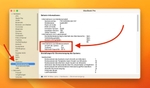
Hold the Option key and click the Apple menu → System Information → Power. Check the cycle count and condition. If it says "Service Recommended," plan for replacement soon.
Can a swollen battery damage my data?
The battery itself won't damage your data, but if it damages other components or prevents your MacBook from working, you may lose access to your files. Always maintain backups.