MacBook Display Issues (2016-2020): Flexgate & Screen Problems
Introduction
Does your MacBook Pro display suddenly have stripes, flicker or show an uneven "stage light effect" at the bottom edge of the screen? Then you may be affected by the notorious Flexgate problem. We explain what causes it, which models are affected, and what repair options exist.
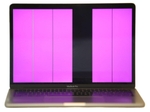
What is the Flexgate Problem?

Flexgate is a design flaw that mainly affects MacBook Pro models from 2016 to 2020. The problem arises from display cables that are too short or too delicate, which wear out from repeatedly opening and closing the laptop.
The Most Common Symptoms:
- Uneven lighting at the bottom edge of the display (the "stage light effect")
- Colored or gray vertical lines on the screen
- Screen flickering, especially when moving the display
- Complete display failure — the screen stays black
Which MacBook Models Are Affected?
| Model | Years | Risk Level | Most Common Issues |
|---|---|---|---|
| MacBook Pro 13" | 2016-2020 | 🔴 Very High | Flexgate, stage light, complete failure |
| MacBook Pro 15" | 2016-2019 | 🔴 Very High | Vertical stripes, flickering |
| MacBook Pro 16" | 2019 | 🟡 Medium | Less common but possible |
| MacBook Air | 2018-2020 | 🟢 Low | Occasional cable issues |
| MacBook 12" | 2015-2017 | 🟡 Medium | Display connection vulnerable |
Especially Critical: Touch Bar Models
MacBook Pro models with Touch Bar (2016-2020) are particularly vulnerable as the display flex cable runs directly alongside the Touch Bar cable. Mechanical stress often affects both components simultaneously.
Apple slightly extended the cable design from 2018 (from 2mm to 6mm), which reduced the problem but didn't completely solve it.
Recognizing Symptoms: Does Your MacBook Have a Display Problem?

Early Warning Signs (Stage 1):
- Occasional brief flickering when opening
- Slight brightness differences at bottom edge
- Display takes a moment to "wake up"
Clear Symptoms (Stage 2):
- Bright spots at the bottom display edge (stage light effect)
- Colorful or gray vertical lines
- Regular display flickering
- Pink or green color distortions
Critical Symptoms (Stage 3):
- Image only visible at certain angles
- Areas of the screen remain black
- Complete failure — no image at all
- White screen where only the backlight is visible
Quick Test for Flexgate:
- Turn on MacBook
- Slowly open display from 45° to 120°
- Wait 5 seconds at each angle
- Watch for flickering, stripes or dropouts
Result: If problems only occur at certain angles → Flexgate likely!
Technical Causes in Detail
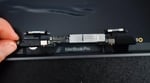
1. Cables Too Short
The display cables in affected models are minimally sized. They are stretched and bent with each opening and closing.
2. Material Fatigue
The thin flex cables consist of delicate conductor tracks that can break through repeated movement.
3. Heat Development
The position of the cables near heat-generating components accelerates wear.
Solution Options

Short-term Measures:
- Try adjusting the display angle — find one where the problem is minimal
- Use an external display as a temporary solution for important work
- Handle carefully and avoid frequent opening/closing
Permanent Repair:
Our Repair Options at Sadaghian:
- Display replacement with original part — complete replacement of display unit including new cables
- A used original display as a more cost-effective alternative with tested parts
- Cable modification — possible on some models but complex
Repair Costs
| Model | Repair Option | Estimated Cost |
|---|---|---|
| MacBook Pro 13" (2016-2020) | New display | €400-600 |
| MacBook Pro 13" (2016-2020) | Used display | €300-450 |
| MacBook Pro 15"/16" | New display | €600-900 |
| MacBook Pro 15"/16" | Used display | €450-650 |
All prices include installation and warranty. You'll receive an exact price after free diagnosis.
Preventive Measures & Free Cleaning
Even though the problem is design-related, you can extend the lifespan:
Free Annual Cleaning at Sadaghian
We offer free cleaning of your MacBook to prevent Flexgate problems. We don't just remove dust from the case, but specifically clean the critical flex cable between logic board and display.
- Professional internal cleaning
- Flex cable inspection
- Preventive maintenance
- Once yearly for free
Prevention Tips:
- Always open the display from the center, slowly
- Don't open beyond 120°
- Don't place anything on the MacBook during transport
- Keep hinges clean and dust-free
- Be aware that extreme cold makes cables brittle
- Use a padded bag for transport
Pro Tip: Mark your optimal opening angle with a small sticker on the display edge. This helps avoid unconsciously opening too far.
Other Display Problems (Not Flexgate)
Not every display problem is Flexgate. Here are other common causes:
LCD Panel Defects:
- Dead pixels — individual dots stay black or white
- Pressure marks — dark spots from mechanical pressure
- Display crack — spider web pattern after a drop
- Liquid crystal failure — black spots spreading across the screen
Graphics Chip Problems:
- Horizontal stripes, often pointing to a GPU problem
- Artifacts like geometric patterns or colorful blocks
- Kernel panic — system crashes under graphics load
Software Problems:
- Problems appearing after a macOS update (driver incompatibility)
- If an external monitor works fine, it's usually a software issue
- If Safe Mode works, there's likely a software conflict
Diagnosis Tip: Connect an external monitor. If it works perfectly, the problem is likely with the display or cable, not the graphics chip.
Display Technologies Compared
Mini-LED (MacBook Pro 14"/16" from 2021)
- Near-AMOLED contrast with local dimming zones
- 1600 nits peak brightness
- ProMotion 120Hz
- Blooming effect possible in dark scenes
Liquid Retina (MacBook Air M2/M3)
- IPS LCD with LED backlight
- 500 nits brightness
- P3 color gamut
- Even illumination
Retina Display (Older Models)
- Standard IPS panel
- 400-500 nits
- sRGB color space
- 2016-2020 models: Flexgate-prone
Spare Parts & Repair Options
For detailed information on available spare parts, visit our Display Parts Overview.
| Repair Option | Price Range | Duration | Warranty |
|---|---|---|---|
| Cable Repair | €180-300 | 1-2 days | 6 months |
| Used Original Display | €400-600 | 1-2 days | 12 months |
| New Original Display | €600-1200 | 2-4 days | 12 months |
| Aftermarket Display | €300-500 | 1-2 days | 6 months |
All display repairs and pricing details are available on our MacBook Display Repair main page.
Emergency Help for Display Problems
Is your MacBook showing stripes, flickering, or the stage light effect? Act quickly before the damage gets worse!
Your Options:
- Visit in person: Leverkusenstraße 3, 22761 Hamburg, Germany
- Express shipping with a free DHL label
- Phone consultation: +49 40-228643240
- WhatsApp support: +49 40-228643211
Why Sadaghian?
- ✅ Free diagnosis & annual cleaning
- ✅ Original & tested used displays
- ✅ Express repair possible
- ✅ 12-month warranty
- ✅ Fixed prices before repair