MacBook Water Damage: Why Rice Doesn't Work
EMERGENCY STEPS - First 5 Minutes Are Critical!
- Power OFF - NOW!
- Hold power button (force shutdown)
- Don't try to save work - every second counts
- Disconnect Power
- Unplug charger immediately
- Remove all cables and peripherals
- Older models (pre-2012): Remove battery if possible
- Open and Invert
- Turn keyboard face down
- Position in tent/V shape
- Let liquid drain out
- DON'T POWER ON!
- No "quick test" - this destroys electronics
- Wait minimum 48 hours (better: get professional help)
24/7 Emergency Hotline: +49 40 228643240
Need a repair? Cost, process & free diagnosis on our Water Damage Repair page →
The Dangerous Rice Myth: Why It Fails on MacBooks
The rice trick originated with simple mobile phones. For modern MacBooks with complex electronics, rice is not just useless but actively harmful. Here's the scientific evidence:
| Rice Problem | Consequence for Your MacBook |
|---|---|
| Rice Dust & Starch | Clogs fans, sticks to keyboard, deposits on chips |
| No Capillary Action | Can't reach moisture under BGA chips (where it matters) |
| Time Loss | 48h in rice = 48h of corrosion! Damage grows exponentially |
| False Security | "Looks dry" ≠ is dry. Microscopic moisture remains |
| Mechanical Damage | Rice grains in USB-C ports, under keys, in vents |
Popular "Home Remedies" That Destroy Your MacBook:
- Rice: Leaves starch residue, clogs openings
- Hair Dryer/Hot Air: Melts solder joints, damages display adhesive
- Heater/Oven: Warps boards, destroys batteries
- Vacuum Cleaner: Static discharge kills chips
- Alcohol/Spirits: Dissolves protective coatings, attacks plastics
- Compressed Air: Pushes liquid deeper into device
Model-Specific Water Damage Risks
Not all MacBooks are equally vulnerable. Here are the critical points by model:
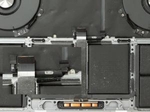
MacBook Pro with Touch Bar (2016-2020)
- Extreme Vulnerability: Touch Bar highly sensitive to moisture
- T1/T2 Chip: Water damage can cause complete lockout
- Butterfly Keyboard: Few drops permanently block keys
- Repair Costs: Often $600-1200 due to Touch Bar
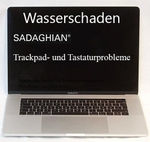
MacBook Air/Pro M1-M4 (2020-2024)
- Everything Soldered: RAM and SSD not replaceable
- Unified Memory: Water damage = often total loss
- But: Better sealing than Intel models
- Success Rate: 80% with quick response
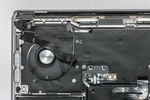
MacBook 12" (2015-2017)
- "The Time Bomb": Extremely vulnerable due to ultra-compact design
- Single USB-C Port: Water damage = no charging option
- Logic Board: Minimally protected, liquid spreads instantly
Older MacBook Pro (pre-2016)
- More Robust: Thicker case offers more protection
- Modular: Individual components replaceable
- Cheaper: Repairs often under $400
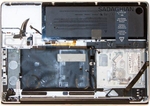
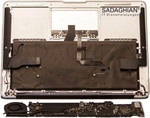
Most Common Water Damage Scenarios
Coffee/Tea Spill on Keyboard (45% of cases)
Problem: Sugar and acid = aggressive corrosion
Critical: Keys stick, Touch Bar fails immediately
Prognosis: Good with immediate professional cleaning
Water Bottle in Backpack (30% of cases)
Problem: Slow infiltration over hours
Critical: Deep penetration, often discovered late
Prognosis: Moderate - depends on discovery time
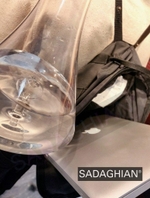
Rain/Condensation (15% of cases)
Problem: Moisture accumulates unnoticed
Critical: Gradual corrosion over weeks
Prognosis: Good if caught early
Bathtub/Sink Drop (10% of cases)
Problem: Complete submersion
Critical: All components affected
Prognosis: Poor, but data recovery often possible
Scientific Facts: Why Rice Physically Doesn't Work
The Physics Behind It:
- Relative Humidity: Rice only reduces this minimally (from 60% to 55%)
- Capillary Effect: Moisture under BGA chips needs vacuum for removal
- Evaporation Rate: Too slow at room temperature (0.001ml/h)
- Corrosion Speed: Exponential - irreversible damage after 6h
What Actually Works:
- Isopropanol 99.9%: Displaces water, evaporates residue-free
- Ultrasonic Bath: Removes contaminants from smallest gaps
- Vacuum Chamber: Lowers boiling point, water evaporates at 20°C
- Hot Air Station: Controlled 60°C for targeted drying
🔬 Fact: A rice grain has a surface area of ~30mm². A MacBook logic board has over 2000 solder joints with 0.1mm² area each. Rice physically cannot "suck" into these areas.
Prevention Measures - How to Protect Your MacBook
Physical Protection:
- Drink Rule: Minimum 50cm distance from MacBook
- Sealed Containers: Only bottles with screw caps
- Elevated Position: Use MacBook stands
- Separate Areas: Keep work and dining areas separate
Technical Protection:
- Keyboard Cover: ONLY when not in use (otherwise heat buildup)
- Waterproof Sleeve: For transport in rain
- Silica Gel Packs: In laptop bag against condensation
Insurance Protection:
- AppleCare+: Covers 2 accidental damages per year
- Homeowner's with Electronics: Often cheaper than AppleCare+
- Special Laptop Insurance: For frequent travelers
Pro Tip: Daily Time Machine backups! In case of total loss, your data is safe and you can continue on a new Mac right away.
Frequently Asked Questions (FAQ)
Can my data be recovered?
In many cases yes! The SSD/hard drive is often not directly affected. We also offer professional data recovery if the MacBook won't start.
Does insurance cover water damage?
Depends on your insurance. Homeowner's insurance with electronics coverage or special laptop insurance often covers liquid damage. AppleCare+ covers water damage with deductible. Detailed info: Insurance Coverage for MacBook Water Damage
Can I save my MacBook myself?
Without expertise and special tools, this is not recommended. Wrong actions can increase damage. Better bring it to a professional immediately.
Can distilled water also cause damage?
Yes! Even distilled water conducts electricity once it absorbs salts and minerals from the boards. It causes the same corrosion as regular water, just slightly slower.
My MacBook still works - repair anyway?
ABSOLUTELY! Corrosion continues working invisibly. What works today can fail completely tomorrow. Professional cleaning now costs $180 - logic board replacement later $800+.
How do I best transport my wet MacBook?
Wrap in a towel (absorbs residual liquid), place in plastic bag (prevents further infiltration), and transport upright if possible. DON'T shake or turn upside down!
MacBook Water Damage? Professional Help
Cost, process and free diagnosis on our Water Damage Repair page.