Right-Click on Mac with Magic Mouse and Trackpad
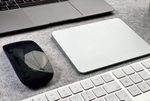
You've probably noticed that instructions sometimes mention a normal mouse click and a right-click. But neither the Mac's Magic Mouse nor the MacBook's trackpad have a second button. What's actually meant is the secondary click.
Settings for Right-Click
If you haven't previously enabled secondary click in settings, it only works on the trackpad but not with the mouse. I'll show you how to find the right-click settings and customize them to your needs.
Settings for the (Magic) Mouse
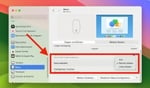
To perform a right-click, you first need to enable the "Secondary click" function in System Preferences: System Preferences → Mouse → Secondary click → "Click on right side".
Settings for the (Magic) Trackpad
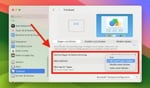
For the trackpad, navigate to settings via: System Preferences → Trackpad → Point & Click → Secondary click. Here you can choose HOW you want to trigger it: "Click with two fingers", "Click in bottom right corner", or "Click in bottom left corner".
Secondary Click and Context Menu Explained
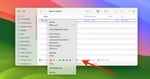
The secondary click usually brings up the context menu. This menu is situation-dependent – it depends on the "context".
The Context Menu in Practice
- When you right-click on a file in Finder, you can select another program under "Open with".
- When you right-click on a link in a browser (e.g., Safari), you can open the linked page in a new tab.
- When you right-click on an attachment in Apple Mail, you can save it via the "Save Attachment" option in the context menu.
Need help configuring your mouse or trackpad?
We optimize input settings, fix gesture issues, and resolve hardware faults.
Contact us for quick support.