MacBook Repair Hamburg
MacBook won't turn on, broken display, water damage, data gone. At our workshop in Hamburg-Altona, we repair Macs at the component level. Only the defective part gets replaced, not the whole logic board. That's cheaper and your data stays intact. Diagnosis costs nothing, and neither does shipping both ways. 12-month warranty on every repair.
Not in Hamburg? Europe-wide mail-in service via emonis.com – free shipping both ways.
Stop by, no appointment needed: Leverkusenstr. 3, Hamburg-Altona · Mon–Fri 10 AM–7 PM. If you like, you can pre-register your device online.

What we repair
Click on any area and you will see prices, the process and a few jobs from the past few weeks.
MacBook Screen Repair & Replacement
Stripes, bars, color shifts, cracked glass, or just no picture at all? We repair the display wherever we can. If the panel can't be saved, we replace only the LCD panel. from €180
Where possible, we repair the display instead of swapping it: your original assembly stays in place, and only the broken part is replaced. In the shop, you pay only at pickup, once the display works again.
Common MacBook screen problems
- Flexgate (MacBook Pro, mainly 2016/2017): broken display flex cable, "stage light" effect, stripes that change with the lid angle. Apple's program has ended, but we repair the cable.
- Staingate: anti-reflective coating peeling off, milky patches. We carefully remove the coating.
- Cracked glass: cracks or fractures from drops or pressure, often leading to black spots.
- Dustgate, pressure damage, backlight failure: rare, but we know what they look like.
More detail on the blog: MacBook screen flickering or showing stripes – diagnosis and repair.
MacBook screen repair & replacement: cost
Wherever possible, we repair your existing display. Depending on the damage, this costs between €180 and €740. If the panel can't be saved, we replace only the LCD panel – the lid, camera, True Tone sensors, cables and hinges stay original. We do not install a complete new display assembly (€700–900 at Apple).
Display repair (your panel stays)
- Staingate (coating removal): €180
- Backlight: from €220
- Flexgate 13" (2016/2017): €240 · Flexgate 15"/16": €340
Panel replacement (when necessary – the display assembly stays original)
- 13" Air (up to M4) and Pro: €420 · 15" Air (up to M4) and Pro: €480
- 14": €740 · 16": €740 · 16" Intel (2019): €580 · Air 13" A1466 (up to 2017): €180
All prices include diagnosis, installation, a functional test (brightness, True Tone, camera) and a 12-month warranty. All prices in euros incl. VAT.
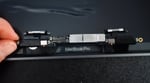

Recent display jobs
- Panel replaced – at the standard price for 14" models; lid and camera stayed original.
- Panel-only replacement; lid and camera stayed original.
- Display assembly swapped for a used unit (Grade C) – the budget alternative to the €580 panel swap.
- Panel replaced; lid and camera stayed original.
MacBook Logic Board (Motherboard) Repair
MacBook won't start, freezes at the Apple logo, shows a question mark, or shuts off on its own? We work at the chip level and replace only what's actually faulty. from €100
Where possible, we repair the existing logic board instead of replacing it. A board swap typically costs two or three times as much. And because the SSD on modern Macs is soldered to the board, a swap also wipes your system and data. A component-level repair leaves both in place.
MacBook logic board failure symptoms
- MacBook won't start, stays black, no sound, no response
- Stuck at the Apple logo, question-mark folder or exclamation mark at boot
- Random crashes, fans at full speed with no load
- Battery won't charge, USB-C ports dead
- MacBook overheating: constantly high temperatures, loud fans with no load, sudden shutdowns. Often a sign of dust in the fan, not just a software problem.
- Wi-Fi not working: MacBook won't connect, can't see networks, or the connection drops. On Intel models, we replace the Wi-Fi/Bluetooth card, and on M-series Macs, the Wi-Fi chip on the logic board.
In depth – symptoms, causes, diagnosis and why we repair instead of replacing: MacBook logic board defect?
Cost by type of damage
- from €100: simple firmware issues, reinstall
- €100–200: capacitors, small ICs, simple troubleshooting
- from €120: USB-C/Thunderbolt connector replacement
- €200–400: power management, charging circuits, SMC chip
- €400–600: CPU/GPU replacement, NAND replacement
All prices in euros incl. VAT.
We work on all generations, from Intel (up to 2020) to Apple Silicon. This includes fixing secondary damage from power surges, bad chargers, and swollen batteries.
Four recent cases
- Repair on the board itself instead of a swap.
- Logic board cleaned – no parts replaced.
- Component-level logic board repair; the board itself stayed in the device.
- Logic board repair plus top case repair – the data stayed intact.
MacBook Water Damage Repair
Coffee, tea, water on the keyboard? Switch the MacBook off right away, unplug it and leave it off. We repair MacBook water damage at the component level and usually recover your data along with the device. from €140
MacBook water damage is repairable in most cases: we clean the logic board, replace corroded components, and test all functions. In the shop, you pay only at pickup, after a successful repair. Act fast, because the first hours are critical.
MacBook water damage: what to do first
- Power off immediately: Hold the power button for 10 seconds. On Touch ID models, that's the sensor in the top-right corner next to the F-keys.
- Disconnect power: Unplug all cables and connected devices.
- Stand the MacBook upside down in an inverted V (tent position): Set it down open with the keyboard facing down and let the liquid drain for at least 30 minutes.
In detail, including the first 24 hours and the most common mistakes: MacBook water damage – what to do?
MacBook water damage repair: cost and process
The prices below apply to current MacBooks (M1 through M6, model years 2020–2026). Pricing for older Intel models works a bit differently – more on that below. Coffee, cola, juice, wine: the same repair, just more cleaning because of the sugar residue. A common scenario: a water bottle leaks in your backpack and the MacBook sits wet for hours before anyone notices. Corrosion gets a head start, but the MacBook can in most cases still be saved.
The diagnosis ends with an exact price. You then decide whether it's worth it to you.
- from €140: when not much has happened and only cleaning is needed – quick response, no water in the display, thorough interior cleaning of the top case and logic board (usually under €200)
- €200–400: corrosion traces or sugary residue (coffee, cola), replacing failed USB-C/Thunderbolt ports, or a small logic board repair
- €400–700: severe damage, multiple failed components or extensive micro-soldering on the logic board
All prices in euros incl. VAT.
Three design details of current MacBooks matter for water damage:
- The SSD is soldered directly to the logic board. If the board is fully damaged, so is the storage. On current MacBooks, data recovery therefore means repairing the logic board far enough for the system to boot. More on that under Data Recovery.
- The battery is permanently connected to the logic board and can't be disconnected by the user. On current MacBooks, the battery is glued in and connected to the logic board through the top case. You can't disconnect it at home. As long as there is voltage on the board, corrosion keeps eating away at wet spots, even after shutdown. So please don't switch the MacBook back on, and bring it to us quickly. Disconnecting the battery is the first step of our repair.
- Keyboard and trackpad form one unit with the top case. We replace only the failed component, not the whole expensive top case.
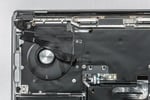
Water damage on older MacBooks (Intel, pre-2020)
For Intel MacBooks made before 2020, we repair the same kinds of damage, usually at lower prices because more components can be swapped individually. Three notes by model:
- MacBook Pro with Touch Bar (2016–2019, 13" and 15"): the Butterfly keyboard jams after just a few drops. On models with the T2 chip (from 2018), the SSD encryption is tied to the chip, so a logic board repair is often the only way to recover the data.
- MacBook 12" Retina (2015–2017): very tight internals, so liquid reaches the logic board in seconds. With heavy damage, a repair is usually only worthwhile when there's important data at stake.
- MacBook Pro pre-2016: thicker chassis, scissor keyboard, far more repairable.
Three water-damage jobs from the past few weeks
- Water damage repair, plus a display panel replacement.
- Interior cleaning after a liquid spill, keyboard replaced.
- Water damage: logic board repaired, top case cleaned.
Data recovery after MacBook water damage
"My MacBook won't turn on after the water damage. Can I still get to my data?" On modern MacBooks (M1 to M6 and Intel models with the T2 chip), data recovery means logic board repair. The SSD can't be removed and read elsewhere. The storage is hardware-encrypted and only readable together with its original logic board.
We repair the board far enough to make it boot, back up your data, and then restore the device to full working condition. In most cases, you get back not just your data but a working Mac too.
More details under Mac Data Recovery; which data can still be saved after liquid damage and what it costs is covered in the post MacBook data recovery.
Why rice, hair dryers and heaters don't help
The rice trick dates from the flip-phone era. On modern MacBooks, it does nothing useful and tends to do more harm: rice dust gums up the keyboard, the rice can't reach the moisture under the BGA chips, and during the 24–48 hours the Mac supposedly spends "drying," corrosion spreads unchecked.
Hair dryers and heaters are actively dangerous. Hot air doesn't dry the inside. It just moves the problem and creates new damage along the way. Key mechanisms warp, keycaps stick or deform, the adhesive holding the display, Touch ID and Touch Bar softens, and components shift. Lithium batteries are also sensitive to heat. At the same time, the airflow drives moisture deeper under the chips instead of out. You end up with two problems instead of one: water damage plus heat damage. The heat damage usually can't be undone.
What actually works: leave the device off and bring it to us quickly.
Who pays for MacBook water damage? Insurance basics
Who pays for a water-damaged MacBook depends on your insurance. Three typical cases:
- Home contents insurance (Hausrat): standard policies usually cover only named perils like fire, water from burst pipes, storms, hail and theft. Spill damage that you caused yourself, such as a spilled coffee, is usually excluded. Extended policies with an "electronics clause" or "extended natural-perils" rider can step in. It's worth checking your policy.
- Electronics insurance: specialized policies (Wertgarantie, Hepster, Friendsurance) usually cover MacBook water damage in full, often including data recovery.
- Personal liability insurance (Privathaftpflicht): if someone else got your Mac wet (friend, colleague, cleaner), their personal liability insurance often covers the damage. Here, too, it's worth checking the policy.
On request, we write a detailed quote and damage report for your insurer.
More repairs
Mac Data Recovery: MacBook & iMac
Lost data after a dead logic board, water damage, or a drop? We pull it straight off the board or the SSD, even in difficult cases. from €150
Even if your MacBook no longer starts, your data is usually still there. On modern Macs (T2, M1–M6), the SSD is soldered to the logic board, so we repair the board until the system boots again and recover your data that way. Diagnosis at our workshop in Hamburg-Altona, mail-in from anywhere in Europe.
First, switch the device off and don't connect it to the charger again. Every further attempt to start it can make the damage worse. On modern Macs (M1 through M6 and Intel with the T2 chip), the SSD is tied to the logic board at the hardware level, so data recovery here means repairing the board far enough for the system to boot. Often you get not just the data back but a working device too.
Data recovery on M1–M6 (Apple Silicon)
On Apple Silicon (M1 through M6), the flash storage is soldered to the logic board and hardware-encrypted via the Secure Enclave inside the SoC. Removing the NAND chips doesn't help: without the matching SoC, the contents can't be decrypted. The only way: repair the board far enough for the system to boot again. This applies to every Pro and Air model across the entire M-series.
Data recovery on T2 MacBooks
On T2 MacBooks, the storage is also hardware-encrypted and tied to the board. The same applies: logic board repair first.
Water-damage data recovery
Coffee, water, wine: any liquid that has reached the board keeps it corroding from the inside. We clean thoroughly and repair at the component level, even in severe cases.
MacBook data recovery cost
- from €150: SSD extraction on Macs with a socketed SSD (models up to about 2017)
- €200–400: simple board repairs
- €400–600: medium complexity
- €600–800: severe damage
All prices in euros incl. VAT.
You only pay when the data recovery succeeds. No success means no cost, not even for the diagnosis. Mail-in works Europe-wide. Data recovery usually takes 5–7 working days in the workshop. We copy the recovered data onto an external SSD that you send in with the device or buy from us.
Why us
Data recovery on modern Macs is logic board repair at the chip level, and that's exactly what we've done every day since 2015. We treat your data as confidential and delete our workshop copies after we hand your data back. More detail on the blog: MacBook data recovery – options and cost.
Three recent recoveries
- Data recovery on one of the newest Apple Silicon models; the recovered data went back in full on an external SSD.
- Failed power-management chip on the logic board; without a board repair, the data would have been lost. Chip replaced, board booted again, data copied off in the workshop. The customer kept using the Mac afterward.
- Overnight: no picture, no boot, no water damage, just dead. On T2 Macs, the SSD is tied to the board at the hardware level, so a board repair was the only way: we traced a short on the main power rail PPBus_G3H and replaced the failed charging IC. The board ran stably enough for Target Disk Mode, and all data was copied.
MacBook Battery Replacement
macOS suggests a battery swap, the MacBook only runs when plugged in, or the case is bulging? Swollen batteries push the keyboard and trackpad up from below and can become dangerous. It's best to replace them sooner rather than later. from €180
On modern MacBooks, the battery is glued in, so the usual fix is to replace the entire top case along with the keyboard and trackpad. We take just the battery out of the chassis and replace only the cell. Your original keyboard, trackpad and lettering stay in place, and the price drops accordingly. We use high-cobalt cells made to our spec. 12-month warranty on the work and the battery.
Signs of a failing MacBook battery
- Swollen battery, case bulges, trackpad is hard to press or sticks
- Battery life under 2 hours (versus 6–8 originally)
- Battery no longer reaches 100% or the level drops fast
- MacBook shuts down without warning, even when it shows charge remaining
- macOS shows the battery condition "Service Recommended"
- The device feels noticeably slow: when the battery is weak, macOS throttles the CPU
If the battery is swollen, please switch the device off at once, disconnect the power adapter and do not charge it anymore. A swollen battery can become dangerous. It's best to bring the device to us or to another workshop soon.
Check your MacBook battery health yourself
Before you have it replaced, check the battery capacity. In current macOS: Apple menu → About This Mac → More Info…, then at the bottom System Report… → Power. There you'll see the cycle count and battery condition ("Normal" or "Service Recommended"). More than 1,000 cycles or the status "Service Recommended" clearly signal that it's time for a replacement.
We check all of this as part of the diagnosis. We also look at SMC data, charge currents and voltage curves that macOS doesn't show you. That tells us whether the battery is really the problem or whether, for example, the charging circuitry is failing.
MacBook battery replacement cost (fixed prices)
- MacBook Air battery replacement (all models): €180
- MacBook Pro battery replacement (all models): €220
All prices include installation, a functional test, a 12-month warranty and VAT. Turnaround: in Hamburg usually the same day or the next day. If you send it in by DHL: 1–2 working days in the workshop, plus 1–2 working days in transit each way. More detail on the blog: MacBook battery replacement – cost and process.
Three battery swaps from the past few weeks
- Wouldn't turn on even with the original 96W adapter; battery completely dead. Replaced the same day, picked up that evening.
- Shut off the moment the adapter was unplugged. Battery removed from the glued chassis and replaced on its own, finished the next day.
- The device felt noticeably slow. That's also a symptom of a weak battery, not necessarily of the SSD or RAM. Diagnosis and replacement in two working days.
Battery take-back notice: We take back the removed battery and recycle it properly. You can also drop off or send us other old batteries from Apple devices free of charge. Batteries do not belong in household trash (crossed-out trash can symbol). Hg, Cd and Pb stand for mercury, cadmium and lead.
MacBook Graphics Card Repair
MacBook GPU failure? Regular crashes, stripes, or kernel panics under load? On Intel Macs, we replace the graphics chip at the component level, without swapping the whole logic board. from €240
This section focuses on Intel MacBook Pros and iMacs with a dedicated graphics chip. For GPU problems, the usual fix is to replace the entire logic board. We repair at the chip level: defective graphics chips, cold BGA solder joints, damaged VRAM modules, or voltage regulators. That's cheaper than a full board swap, and your data stays intact.
MacBook turns on but the screen stays black?
A failing graphics chip usually shows clear symptoms. If your MacBook plays the startup chime or the fans spin, but the screen stays black, first check the steps in MacBook black screen – on an Intel MacBook Pro with a dedicated graphics chip, the GPU can be the cause. The blog explains how to tell whether stripes come from the display or the GPU: MacBook screen flickering – stripes and GPU faults explained. Other signs of a MacBook GPU failure:
- Colored lines, stripes, or garbled graphics on the display
- Kernel panics and crashes in graphics-heavy apps (video editing, 3D, gaming)
- External monitor gets no signal either
- Fans at full speed with no load (GPU thermal cutoff)
Which MacBooks & Macs we repair
- MacBook Pro 15" & 17" Unibody (2011): The notorious Radeongate defects of the AMD Radeon HD 6490M/6750M/6770M. We replace the whole chip, because reballing alone rarely lasts on this generation (the defect sits in the chip-package underfill).
- MacBook Pro 15" Retina (2012–2015): NVIDIA GeForce GT 650M or GT 750M, and AMD Radeon R9 M370X. Typical issues: overheating, cold solder joints.
- MacBook Pro 15"/16" (2016–2019): AMD Radeon Pro 450/455/460, 555/555X/560/560X, Vega 16/20, and 5300M/5500M/5600M. Chip replacement by BGA rework is possible.
- iMac graphics repair (through 2020): Up to 2011, we replace the plug-in MXM graphics card (e.g., AMD Radeon HD 6970M) or repair the MXM card itself at the chip level. From 2012 on, we replace the graphics chip on the logic board.
Prices & process
MacBook GPU repair from €240. You get a 12-month warranty on the repair. If the board is damaged beyond chip-level repair (torn pads, blown VRMs), we switch to a logic board repair, or, if the machine itself isn't worth fixing, a data recovery.
All prices in euros incl. VAT.
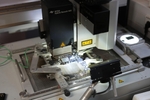
Our BGA rework station
We replace defective graphics chips using an Ersa HR 600 rework station: camera alignment, controlled hot air, precise temperature profiles. The new flip-chip BGA sits on the board with sub-millimeter precision.
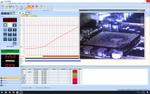
Two GPU repairs from the past few weeks
- Radeongate (AMD HD 6750M): stripes on the display, freezes under load, restart loops. Apple's repair program expired years ago, and reballing alone rarely lasts on this generation because the defect sits in the chip-package underfill, not the BGA joints. So we pulled the AMD chip and installed a revised replacement. Stable ever since.
- MXM graphics card: the 2011 iMacs have the GPU on a socketed MXM card (AMD Radeon HD 6970M), the same AMD generation as the Pros of the same year. Bluish tint and picture dropout once the GPU warmed up. Graphics chip on the MXM card replaced. The Apple Service Diagnostic (ASD) VRAM stress test passed without errors afterward.
MacBook Keyboard, Trackpad & Top Case Repair
MacBook keyboard stuck, trackpad unresponsive, speakers crackling, or keyboard backlight gone? We replace only the defective part instead of the entire top case with its battery and logic board mounts. from €80
On a MacBook, the top case houses the keyboard, trackpad, speakers, and battery, all riveted into a single aluminum unit. When one part fails, the usual fix is to replace the whole top case, often for €500 to €800. We pry out just the defective component and replace it on its own. That's cheaper and more sustainable, and your original housing stays in place.
MacBook keyboard stuck, trackpad broken, or speakers silent?
- Sticky, dead, or unresponsive keys (Butterfly or Magic Keyboard)
- Trackpad stiff, stuck, won't click, or registers clicks in the wrong spot
- Speakers crackling, distorting at higher volume, or silent
- Swollen battery pushing the trackpad and keyboard up from below (safety-critical, see Battery Replacement)
- Keyboard backlight flickering or completely out
- Liquid damage from coffee, water, wine, or other drinks (see Water Damage Repair)
MacBook keyboard replacement, trackpad & speakers: cost
- Keyboard swap: individual keys from €80, full keyboard assembly from €140
- Trackpad swap: from €100 (incl. Force Touch & Taptic Engine calibration)
- Speaker swap: from €100 (also for the heavily glued speakers in Apple Silicon Macs)
All prices in euros incl. VAT.
Every repair carries a 12-month warranty – on the work and the installed parts.
Why not just swap the whole top case?
The full top case contains the keyboard, trackpad, battery, and speakers, riveted into one aluminum frame. The whole unit usually gets swapped to save time, even when only one key is broken. At our bench, your Mac goes under the microscope: we remove the keyboard rivets, carefully separate glued parts, install new components, and secure the keyboard with special micro-screws in the original holes. More effort on our side, noticeably cheaper for you.
Three recent cases
- Trackpad and trackpad cable replaced individually, top case cleaned – battery and housing stayed original.
- Keyboard unit replaced, logic board cleaned.
- Keyboard replaced on its own; the top case stayed original.
MacBook Upgrade
MacBook slow or out of storage? On older Intel models (MacBook Air up to 2017, otherwise up to late 2015), we install bigger SSDs and, on the MacBook Pro up to 2012, more RAM. A single upgrade usually costs under €300, and the machine feels new again. from €80
We upgrade older Intel MacBooks (MacBook Air up to 2017, otherwise up to late 2015) with modern SSDs, and the MacBook Pro up to 2012 with extra RAM as well. Apps launch up to 10× faster, battery life improves, and the device runs silently.
MacBook SSD & RAM upgrade: prices
- SSD upgrade: from €180 (installation of up to 2 TB, data migration, macOS update)
- RAM upgrade: from €220 (up to 16 GB)
- Full upgrade: from €320 (SSD + RAM + macOS Sequoia via OpenCore)
- SSD installation with your own drive: from €80
All prices in euros incl. VAT.
What's possible, what isn't
- Upgrade possible: MacBook Pro 2008–2012 (SSD and RAM; 16 GB from the 2011 models on, 8 GB before that), MacBook Pro Retina 2012–2015 (SSD only), MacBook Air 2010–2017 (SSD only)
- Limited: MacBook Pro 2016+ has soldered components
- No upgrade: M1/M2/M3/M4/M5/M6 MacBooks, only battery replacement and a system reinstall
iMac Repair
Display, graphics, logic board, or power supply problems on an iMac? We repair every iMac from G3 through M6 at the component level, including vintage models. from €140
Whether it's graphics faults, display damage, a faulty logic board, or power supply, fan or SSD trouble, we repair all iMac models from G3 through M6 and the iMac Pro at the component level.
iMac M1, M3, M4 & M6 (Apple Silicon)
We repair current Apple Silicon iMacs: defective SSDs, power supply, display, USB-C, Thunderbolt. This covers all M1/M3/M4/M6 models.
iMac GPU failure & graphics problems
Stripes, black screen, flickering display, loud fans? We replace only the defective graphics chip, not the entire logic board. Affected chips: Radeon HD 4670, 4850, 5670, 5750, 6770, 6970, GeForce GT 650M, and more.
iMac screen replacement: cost
- 21.5" HD: €340 · 21.5" 4K: €440
- 24" M1/M3/M4/M6: €740
- 27" QHD: €420 · 27" 5K: €620
- Vintage iMacs: from €260
All prices in euros incl. VAT.
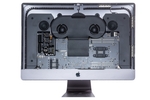
We also handle chip-level logic board repairs, power supply and fan replacement, port repairs, RAM and SSD upgrades, data recovery and maintenance, plus EFI/firmware repairs and capacitor replacement.
All prices at a glance: MacBook Repair Cost 2026

Hamburg Workshop
Leverkusenstr. 3, Hamburg-Altona. Just walk in, no appointment needed:
- You drop off your device
- We diagnose it for free and give you a quote
- You pick up your repaired MacBook, with a 12-month warranty
In the shop you pay in cash, by debit card or by credit card.
Mon–Fri 10 AM–7 PM
If you pre-register your device online, your drop-off receipt is ready when you come in.
MacBook repair throughout Europe
Whether you're in Berlin, Munich, Cologne, Frankfurt or a village of 200 people, you create a free shipping label, pack your MacBook and send it off. After the repair, it comes back insured (DHL liability up to €500 per parcel).
Round-trip shipping is free. Diagnosis after arrival: usually 1 to 2 working days for display problems, usually within one working day for battery problems, usually 2 to 3 working days for water damage (sometimes less, sometimes more), otherwise usually 1 to 3 working days.
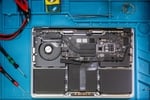
Your MacBook repair workshop in Hamburg-Altona
Since 2015, we've been repairing Macs as a small team in Hamburg-Altona. Workshop, parts warehouse, and office are under one roof. Each technician has different strengths: one's great with logic boards, another with displays, a third with data recovery. Because everything's in one place, things move faster.
Our approach: we repair the existing hardware at the component level instead of replacing whole assemblies. Where a fault would otherwise mean swapping the entire logic board, we examine the board under a microscope and use a soldering station to replace just the faulty chip or capacitor. That's usually far cheaper, keeps the device out of e-waste, and leaves your data on the original board.
Whether it's a display replacement, water damage, or complex data recovery, every repair starts with a free diagnosis. Then you decide at your own pace. We give a 12-month warranty on every repair.

Mail-in MacBook repair, Europe-wide
About half the Macs we see aren't from Hamburg. Many come from Schleswig-Holstein and Lower Saxony, and Macs regularly arrive from Munich, Freiburg, and even the North Sea island of Föhr. How it works:
After the diagnosis, you get a fixed price. You decide whether it's worth it. If not, we ship the device back free of charge.
You only pay when the repair is finished and successful – with Apple Pay, Google Pay, Amazon Pay, Link, card, Klarna, SEPA direct debit or bank transfer.
Mail-in runs through our shop on emonis. There you register your device and track the diagnosis, price and repair online.

Common questions
How long does a MacBook repair take?
Diagnosis after arrival: usually 1 to 2 working days for display problems, usually within one working day for battery problems, usually 2 to 3 working days for water damage (sometimes less, sometimes more), otherwise usually 1 to 3 working days. Then you get a price and decide. After your approval, the repair itself usually takes one working day. Battery swaps and simple keyboard jobs are often done the next day in Hamburg.
Do you offer a warranty on repairs?
Yes, we give a 12-month warranty on every repair, covering the work done and the parts installed. This warranty does not affect your statutory rights regarding defects.
Can I mail in my MacBook for repair from anywhere in Europe?
Yes, and the diagnosis is free. You can send your device with our shipping label. If you decide against a repair, return shipping is still free. Our guide to mail-in MacBook repair explains the full process.
How can I pay?
In the shop you pay in cash, by debit card or by credit card. For mail-in you pay online when the repair is finished and successful – with Apple Pay, Google Pay, Amazon Pay, Link, card, Klarna, SEPA direct debit or bank transfer.
Will my data be preserved during a MacBook repair?
Yes, in almost all repairs. We repair the existing logic board instead of replacing it, so the SSD stays in place. With a full board swap or a total loss, data recovery is a separate step, which we also offer.
Where is your workshop located?
Our workshop is at Leverkusenstr. 3 in Hamburg-Altona. Opening hours: Mon–Fri 10 AM–7 PM. You can also mail in your device from anywhere in Europe.
Should I repair my MacBook or buy a new one?
Rule of thumb: if the repair costs less than a third of the price of a new one and the Mac is less than six or seven years old, a repair usually pays off. With very old machines, we'll tell you that too. We'd rather not sell you a repair that doesn't make sense.
Can I read customer reviews before booking?
Over 460 reviews on Google, with an average of 4.95 out of 5. A few of them (originals in German):
- „Riesen Empfehlung! Mein Mac konnte schon zum 2. Mal super zuverlässig, schnell und preislich absolut fair repariert werden.“ (Esther M.)
- „Toller und schneller Service. Vielen Dank.“ (MeinHamsterHorst)
- „Superschnell, kompetent und zum fairen Preis!“ (Laya-Papaya)
- „Super schnelle und unkomplizierte Hilfe zu einem fairen Preis. Dazu super nettes Team – sehr zu empfehlen.“ (Finn O.)
- „Mein MacBook Pro hatte einen Wasserschaden. Noch am selben Abend per WhatsApp kontaktiert, eine Woche später wieder abgeholt, läuft seitdem einwandfrei.“ (Stefan M.)
Source: Google Maps listing SADAGHIAN® e.K., Hamburg. We do not verify the Google reviews ourselves. Google uses its own measures against fake reviews.
You can read all reviews on Google and ProvenExpert.
Can a MacBook logic board be repaired?
Yes, often. We repair the existing logic board at the component level instead of swapping it. That's usually much cheaper, and because the SSD is soldered to the board, your system and data stay intact. More in the logic board repair section above.
What does a MacBook logic board repair cost?
The cost of a logic board repair depends on the damage: simple firmware issues from €100, small components €100–200, power management and SMC €200–400, CPU/GPU or NAND replacement €400–600 (all prices incl. VAT). We often repair individual components instead of swapping the entire board. Learn more in the logic board repair section above.
Which MacBook models do you repair?
We repair all MacBook models: MacBook Air, MacBook Pro (all sizes), both Intel and Apple Silicon models (M1, M2, M3, M4, M5, M6), as well as older models and vintage Macs.
Can a water-damaged MacBook still be repaired?
Yes, in most cases. Important: switch the MacBook off at once and do not charge it. Repair costs for water damage on current MacBooks (M1–M6) depend on the extent: from €140 when not much has happened and only interior cleaning is needed (usually under €200 with a quick response), corrosion or port replacement €200–400, severe damage with micro-soldering €400–700. Individual cases can run a bit higher or lower. More in the water damage section above.
What does a MacBook battery replacement cost?
MacBook battery replacement: €180 for all MacBook Air models, €220 for all MacBook Pro models. All prices include installation, a functional test, a 12-month warranty and VAT.
What does a MacBook repair cost?
As a rough guide: battery replacement at a fixed €180 (MacBook Air) / €220 (MacBook Pro), display repair from €180, water damage from €140, all prices incl. VAT. The diagnosis with a cost estimate gives you the exact price. Then it's your decision, and if you decide against the repair, you pay nothing. More on the blog: All prices and real numbers from the workshop.
Can an old MacBook be upgraded?
On Intel MacBooks up to late 2015 (MacBook Air up to 2017), yes. The SSD is socketed, RAM can be upgraded only on the MacBook Pro up to 2012, and upgrades start at €80. On all Apple Silicon Macs (M1–M6) and many late Intel models, RAM and SSD are soldered, so no upgrade is possible. In that case, we advise you on repair or replacement.
My MacBook won't turn on anymore – what now?
First, check the battery and the charger: plug in the charger, wait a few minutes, then hold the power button for ten seconds. If the machine stays silent, we run a diagnosis in our workshop in Hamburg-Altona, also for customers from Schleswig-Holstein, for example from Norderstedt, Pinneberg, Bad Segeberg, Kaltenkirchen, Kiel or Flensburg. You can drop it off or mail it in via DHL. Diagnosis with a fixed price comes first, then you decide. The full guide: MacBook won't start – causes and solutions.
Last updated: